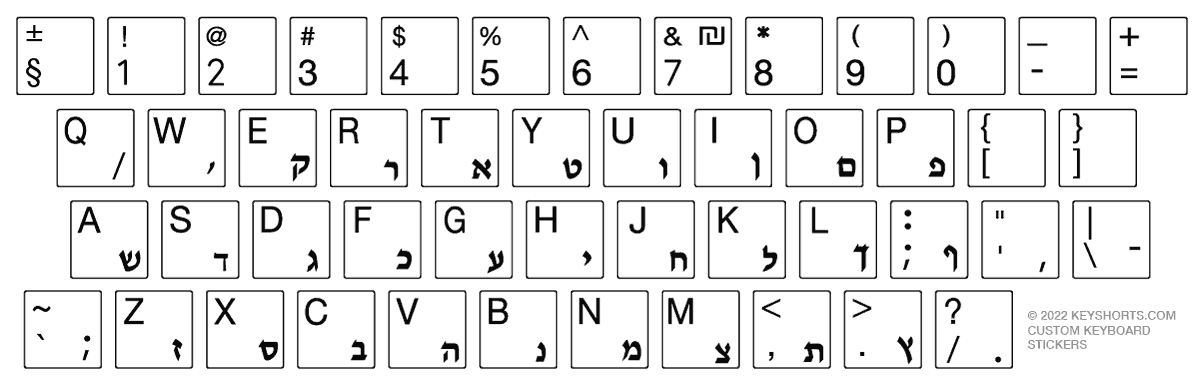
Home Language guides Hebrew keyboard

Hebrew Keyboard Guide 🇮🇱

Hebrew keyboard layout, accents and symbols

See the Hebrew layout for Mac or Windows, type Hebrew characters online, copy accents in one click, or convert your physical keyboard to Hebrew.

✓ Free online keyboard ✓ Mac and Windows layouts ✓ One-click symbol copying

Visual reference

Hebrew keyboard layout

Choose your operating system. Mac and Windows may use a different key legends around the keyboard.

Hebrew keyboard layout on Mac

Hebrew layout for macOS.

Add on Mac

Immediate task completion

Type Hebrew online or copy special characters

Use the text box for a sentence, or copy a single symbol directly from the table.

Free Hebrew online keyboard

Hebrew accents and special symbols

Every symbol has a dedicated one-click copy button.

Symbol Copy
־
׳
״
ְ
ֱ
ֲ
ֳ
ִ
ֵ
ֶ
ַ
ָ
ֹ
ֻ
ּ
ׁ
ׂ

System layout instructions

How to add a Hebrew keyboard layout

Select your device to see only the instructions you need.

Add Hebrew on Windows 11

Start → Settings → Time & language → Language & region
  1. 1
    Add Hebrew if needed

    Under Preferred languages, choose Add a language, search for Hebrew, and install it.

  2. 2
    Open Language options

    Select the menu next to Hebrew, then choose Language options.

  3. 3
    Add the layout

    Under Keyboards, select Add a keyboard and choose the Hebrew layout you need.

  4. 4
    Switch while typing

    Press Windows + Space to move between installed keyboard layouts.

Choose the right solution

How often do you type in Hebrew?

Choose between immediate copying, a software layout, or visible Hebrew legends on the keyboard.

Occasional use

Copy or type online

Best for a few accents, a short message or a form.

  • ✓ No installation
  • ✓ Works on any device
  • ✓ Free and immediate
Use the online keyboard
Regular typing

Add Hebrew in settings

Best when you type Hebrew often but do not need labels on the physical keys.

  • ✓ Built into your device
  • ✓ Fast layout switching
  • ✓ No physical change
See setup instructions
Best physical solution

Add visible Hebrew legends

Best for learning, converting a keyboard, or keeping two languages visible.

Compare Hebrew stickers

Common questions

Hebrew keyboard FAQ

How to convert my keyboard to Hebrew

The easiest way to convert your current keyboard language to Hebrew is by keyboard stickers. Keyshorts makes highest quality Hebrew keyboard stickers that will fit your keyboard. Keyshorts offers opaque/covering stickers that convert/hide your current layout with Hebrew. Learn more below.

How to add Hebrew letters to my keyboard on a side without losing backlight?

The easiest way to add Hebrew to your current keyboard language - without changing it - is by keyboard stickers. Keyshorts makes highest quality Hebrew transparent keyboard stickers that will fit your keyboard. Hebrew symbols are added in one of key's corners, without clashing with your existing letters. They are also fully backlight compatible. Learn more below.

What is the history of the Hebrew keyboard?

The Hebrew keyboard grew from Hebrew typewriter layouts and was later standardized for computer use. Hebrew is written from right to left, so text direction differs from English even though the physical keyboard itself retains the familiar rectangular arrangement.

The keyboard includes the regular Hebrew alphabet as well as the five final letter forms used at the ends of words. Vowel points, or nikud, and cantillation marks are not normally needed in everyday writing but can be entered through additional key combinations when working with educational, religious, or linguistic texts.

How to learn Hebrew?

Pealim is particularly useful for Hebrew verb forms, pronunciation, and vocabulary reference. HebrewPod101 provides structured listening and speaking lessons, while reading short Israeli texts is an effective way to become comfortable with unpointed Hebrew.

Need Hebrew visible on your keys?

Compare opaque conversion stickers with transparent, backlight-compatible Hebrew labels.

Shop Hebrew stickers
Hebrew stickers
Copied!